What this does:
Query Builder allows you to create advanced searches using multiple fields, operators and values. Queries can be saved and reused, making it easier to perform regular searches without rebuilding criteria each time.
Query Builder allows you to create advanced searches using multiple fields, operators and values. Queries can be saved and reused, making it easier to perform regular searches without rebuilding criteria each time.
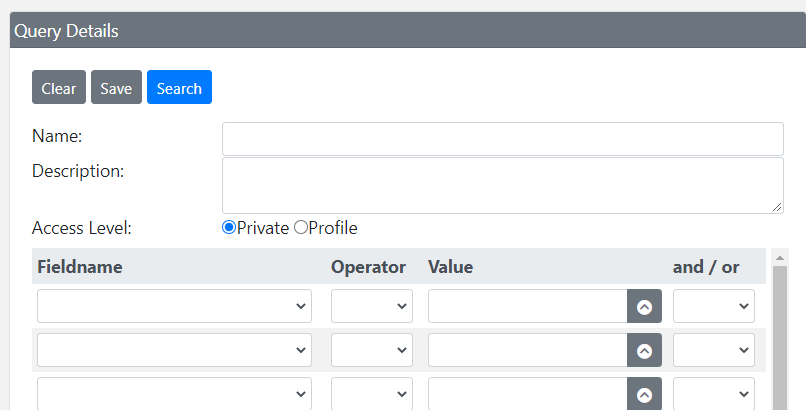
Query Builder allows multiple search conditions to be combined using AND
/ OR logic, creating powerful searches tailored to your requirements.
Building a Query
Select a Field
Choose a field from the Fieldname dropdown list.Select an Operator
Choose the comparison operator to use such as Equals, Contains, Greater Than or Less Than.Enter a Value
Enter the value you wish to search for. Previous values can be viewed using the button.Multiple Criteria
Add multiple rows and combine them using AND or OR operators.Execute Search
Click the button to run the query.Search Reasons
Depending on your profile, you may be prompted to enter a reason before the search is executed.Saving Queries
Queries can be saved for future use.
- Enter a name and optional description.
- Click the Save button.
- Select either Private or Profile access.
- Private queries are only visible to the creator.
- Profile queries are available to users within the same Transearch profile.
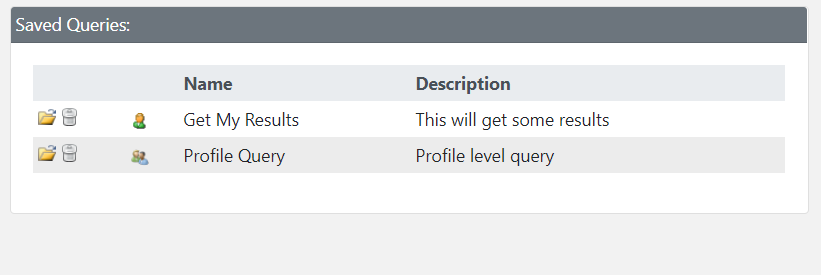
Saved queries can be opened, reused and deleted directly from the Saved
Queries panel.
Open Query
Click the icon to load a saved query.
Delete Query
Click the icon to delete a saved query.
Access Levels
 Private
 Profile
Wildcard Searches
| Wildcard | Description |
|---|---|
| * or % | Represents zero, one or multiple characters. |
| ? or _ | Represents a single character. |
Wildcard Examples
| Example | Result |
|---|---|
| a* | Finds values beginning with "a" |
| *a | Finds values ending with "a" |
| *or* | Finds values containing "or" |
| ?r* | Finds values with "r" in the second position |
| a?*?* | Finds values beginning with "a" and at least 3 characters long |
| a*o | Finds values beginning with "a" and ending with "o" |
Wildcard Search Tester
Try wildcard searches against the sample data below.
Sample Records
Andrew, Anthony, Aaron, Robert, Jordan, George, Connor, Marco
Andrew, Anthony, Aaron, Robert, Jordan, George, Connor, Marco
Matches
All records shown
Date Formats
Dates should be entered using one of the following formats:
dd/mm/yyyy dd/mmm/yyyy mmm/dd/yyyy
dd/mm/yyyy dd/mmm/yyyy mmm/dd/yyyy
Predefined Date Variables